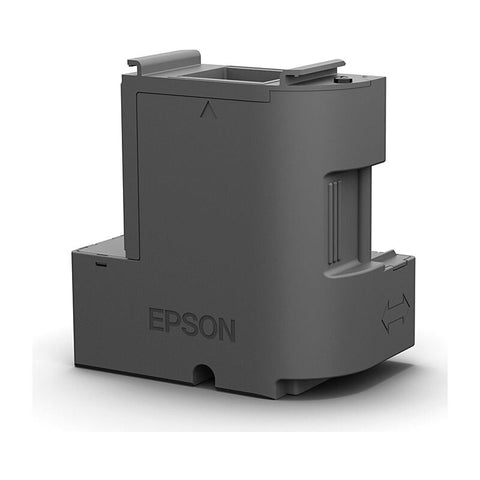

Epson T2950 Maintenance Box (C13T295000) – Genuine, for WorkForce WF-100
The Epson T2950 Maintenance Box (C13T295000) is a genuine Epson replacement part that collects the ink flushed out during automatic print-head cleaning on the Epson WorkForce WF-100 mobile printer. It's a required consumable, not an optional extra — once it's full, the printer will stop printing and cleaning until it's replaced.
Compatibility
This maintenance box is confirmed compatible with the Epson WorkForce WF-100. Check your printer's model number (printed on the front panel or under the lid) against this before ordering — maintenance boxes are model-specific and won't fit printers outside this range.
What it is / cartridge type
- Type: Genuine Epson (OEM) maintenance box, not a compatible or remanufactured part
- Part / SKU: C13T295000 (also listed as T2950 / T295000)
- Function: catches waste ink expelled during print-head cleaning cycles — it does not hold printable ink
What's included
- 1 maintenance box per order
Why the genuine part matters
Every maintenance box has a small chip that tells the printer how full it is. Third-party or incorrectly matched boxes are a common cause of "maintenance box not recognized" errors, because the chip data doesn't match what the printer expects. Using the genuine Epson C13T295000 removes that risk and keeps your WF-100's ink level and service alerts accurate.
When to replace it
Epson doesn't publish a fixed page count for maintenance box life, because usage depends on how often the printer runs cleaning cycles rather than how many pages you print. Your WF-100 will show an on-screen or software alert when the box is nearing full and again when it must be replaced before printing can continue.
Is this maintenance box compatible with my Epson WorkForce WF-100?
Yes. The C13T295000 (T2950) is the genuine maintenance box for the Epson WorkForce WF-100. Check your printer's model number before ordering. Browse more Epson printers and supplies.
Is this a genuine Epson part or a compatible/remanufactured one?
It's a genuine Epson (OEM) C13T295000 maintenance box — not a compatible or remanufactured alternative.
What does a maintenance box actually do?
It collects ink flushed out during automatic print-head cleaning. It's a waste-ink container, not an ink supply.
How do I know when my WF-100's maintenance box needs replacing?
Your printer shows an on-screen alert when it's nearly full, and another when it must be replaced. No fixed page count is published — it's based on cleaning cycles, not pages printed. We also stock Epson 215 Black and Epson 215 Colour ink cartridges.
What happens if I don't replace it in time?
The WF-100 stops printing and blocks print-head cleaning until a new box is installed. No damage to the printer.
Why does my printer say "maintenance box not recognized" after I install a new one?
Usually a chip mismatch, more common with third-party boxes. The genuine C13T295000 avoids this. If it happens, power off, reseat the box until it clicks, and power back on.
How many maintenance boxes come in this order?
1 maintenance box per order.
Can I use a compatible/third-party maintenance box instead of the genuine one?
Some work, but chip mismatches are a frequent cause of "not recognized" errors. The genuine C13T295000 is built to match the WF-100's chip reader exactly.